
Automating repetitive tasks is a cornerstone of efficient application development, and Spring Boot offers robust capabilities for scheduling these operations. Whether you need to run daily reports, clean up old data, or send out periodic notifications, Spring’s `@Scheduled` annotation provides a powerful and flexible solution. Understanding how to leverage scheduled cron Spring functionality empowers developers to define highly precise execution times for their background processes, ensuring applications run smoothly and data remains consistent without manual intervention. This guide will walk you through setting up and optimizing your scheduled tasks using cron expressions within your Spring Boot applications.
See also: Complete Guide to Cron, Cron Job Syntax: Mastering Crontab Scheduling, How to Create, Edit, and Delete Cron Jobs, Resolving Cron Job Environment Variable and PATH Issues, Troubleshooting Cron Jobs: Why Your Scheduled Tasks Aren't Running.Introduction to Scheduled Tasks in Spring Boot
Scheduled tasks are essential for many modern applications, allowing developers to execute specific code blocks at predetermined intervals or times without user interaction. These background processes are crucial for maintaining data integrity, performing system cleanups, generating reports, and integrating with external systems. Spring Boot simplifies the implementation of such tasks with its comprehensive scheduling support, making it easy to add automation to your projects.
The framework’s `spring-context` module provides the necessary annotations and infrastructure to define and manage scheduled jobs effortlessly. By embracing Spring Boot’s scheduling features, developers can build more resilient and self-sufficient applications. This capability is particularly powerful when combined with cron expressions, offering unparalleled control over execution timing for complex requirements, forming the core of scheduled cron Spring solutions.
Basic-fixed-rate-and-fixed-delay-scheduling">Implementing Basic Fixed-Rate and Fixed-Delay Scheduling
Spring Boot’s `@Scheduled` annotation is the primary mechanism for defining scheduled tasks, offering straightforward options for simple recurring jobs. The `fixedRate` attribute specifies that a task should be executed at regular intervals, regardless of the previous execution’s completion time. For example, `fixedRate = 5000` means the task will start every 5 seconds. This is ideal for tasks that need to run consistently without drifting.
Conversely, the `fixedDelay` attribute ensures that there is a specific delay between the completion of one task execution and the start of the next. If a task takes longer to run, the next execution will still wait for the specified delay after the previous one finishes. An `initialDelay` attribute can also be used with both `fixedRate` and `fixedDelay` to specify the delay before the first execution of the task. These basic options are excellent for simple periodic operations, but for more intricate timing, cron expressions come into play.
Advanced Scheduling with Cron Expressions in Spring Boot
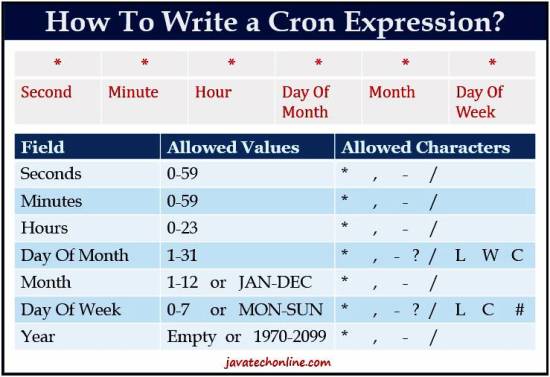
For scenarios requiring more sophisticated scheduling patterns, Spring Boot seamlessly integrates with cron expressions, offering immense flexibility. A cron expression is a string consisting of six (or sometimes seven) fields separated by spaces, each representing a unit of time: seconds, minutes, hours, day of month, month, day of week, and an optional year. This powerful syntax allows you to define schedules like “every Monday at 9 AM” or “the last day of every month at midnight.”
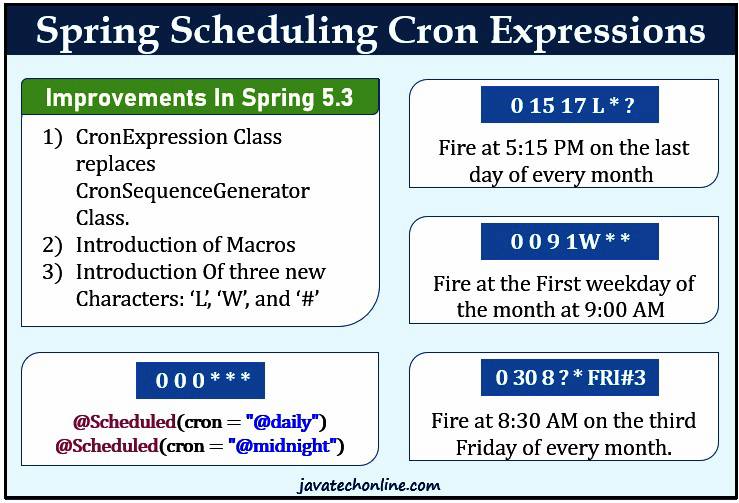
Using cron expressions with Spring’s `@Scheduled` annotation is straightforward; you simply provide the cron string as an attribute. For instance, `@Scheduled(cron = “0 0 9 MON”)` would execute a task every Monday at 9:00 AM. Mastering these expressions is key to unlocking the full potential of scheduled cron Spring applications, enabling precise control over when your automated jobs run. Several online tools and resources are available to help you construct and validate cron expressions for your specific needs, making complex scheduling much more manageable. You can explore a helpful resource for understanding cron expressions and generating them at [crontab.guru](https://crontab.guru/ “Cron Expression Generator”)
Cron expressions utilize special characters like `` (any value), `?` (no specific value), `/` (increment), `-` (range), and `,` (list of values) to define intricate patterns. For example, `0 0/15 *` would run every 15 minutes, starting at the top of the hour. Understanding these characters and their combinations is crucial for accurately defining your scheduled tasks. Spring’s robust integration ensures that once defined, these tasks are reliably executed according to your specified cron pattern, providing a reliable backbone for your application’s automation.
Configuration, Best Practices, and Testing for Scheduled Tasks
To enable scheduling in your Spring Boot application, you must annotate one of your configuration classes with `@EnableScheduling`. This annotation tells Spring to look for methods annotated with `@Scheduled` and set up the necessary infrastructure to run them. For more complex applications with multiple scheduled tasks, you might want to configure the underlying thread pool to handle concurrent executions effectively. You can adjust the pool size using properties like `spring.task.scheduling.pool.size` in your `application.properties` or `application.yml` file, preventing tasks from blocking each other.
When implementing scheduled cron Spring tasks, adherence to best practices is crucial for building robust and maintainable applications. Ensure your scheduled tasks are idempotent, meaning they can be run multiple times without causing unintended side effects. Implement proper error handling and logging within your scheduled methods to quickly identify and diagnose issues. For long-running tasks, consider making them asynchronous to avoid blocking other scheduled jobs or the main application thread, using `@Async` in conjunction with `@Scheduled`.
Testing scheduled tasks can be challenging due to their time-based nature, but it’s an essential part of the development process. You can use techniques like mocking the system clock or using libraries such as Awaitility to wait for asynchronous operations to complete. Writing integration tests that verify task execution and the resulting state changes will ensure your schedules function as expected in a real environment. By following these guidelines, you can develop reliable and efficient scheduled tasks that enhance your Spring Boot application’s overall functionality and stability.
