
Setting up your own secure remote access solution is crucial for many users and businesses today. The RustDesk self hosted setup offers a powerful, open-source alternative to commercial remote desktop software. This guide will walk you through the process, ensuring you gain full control over your remote connections. Understanding how to deploy RustDesk on your own server provides enhanced privacy and performance.
Introduction to RustDesk Self-Hosted Setup
RustDesk is a feature-rich remote desktop application, written in Rust, that provides secure and efficient remote access. Unlike services that rely on third-party servers, a RustDesk self hosted setup allows you to host all components yourself. This means your data never leaves your infrastructure, offering unparalleled security and operational independence. Consequently, many users choose this option for sensitive environments.
What is RustDesk and Why Self-Host?
RustDesk functions similarly to popular remote desktop tools, enabling you to control another computer remotely. It supports various platforms, including Windows, macOS, Linux, and even mobile devices. Self-hosting RustDesk means you run the rendezvous server (hbbs) and relay server (hsts) on your own hardware. Therefore, you maintain complete ownership of your connection data and metadata.
The primary reason for a RustDesk self hosted setup is enhanced security and privacy. When you self-host, you remove reliance on external servers. This minimizes potential data breaches or privacy concerns associated with third-party services. Additionally, it can improve connection speeds by routing traffic directly through your network. You gain full control over server configurations and updates.
Benefits of a Self-Hosted RustDesk Solution
Opting for a self-hosted RustDesk solution brings several significant advantages. Firstly, you achieve complete data sovereignty. All connection information stays within your control. Secondly, it offers superior performance, especially for users geographically close to your server. Furthermore, you avoid subscription fees often associated with commercial remote desktop products. This makes it a cost-effective choice in the long run.
- Enhanced Security: Your data remains entirely within your private network.
- Full Control: Manage server resources, configurations, and user access.
- Cost-Effectiveness: Eliminate recurring subscription costs.
- Improved Performance: Potentially faster connections due to optimized routing.
- Customization: Tailor the server to your specific needs and integrate with existing systems.
Essential Pre-requisites for RustDesk Self-Hosting
Before beginning your RustDesk self hosted setup, certain foundational elements must be in place. Proper preparation ensures a smooth installation and reliable operation. Overlooking these steps can lead to frustrating issues later on. Therefore, careful planning is essential for success.
Hardware and Software Requirements for RustDesk Server
The server requirements for RustDesk are surprisingly modest, especially for personal use. A virtual private server (VPS) with 1 CPU core, 1GB RAM, and 20GB storage is usually sufficient. For more demanding scenarios or many concurrent users, however, scaling up resources is advisable. The server operating system should be Linux-based, such as Ubuntu or Debian, for optimal compatibility and performance. Ensure your chosen OS is up-to-date.
Network Configuration and Firewall Rules for RustDesk
Correct network configuration is critical for your RustDesk self hosted setup. You must open specific ports on your server’s firewall to allow RustDesk clients to connect. These include TCP port 21115 (hbbs), TCP port 21116 (hbbs for WebSocket), TCP port 21117 (hsts), and UDP port 21116 (hbbs for hole-punching). Furthermore, if you plan to use a domain name, ensure your DNS records point correctly to your server’s IP address.
Domain Name and SSL Certificate Considerations
While not strictly mandatory, using a domain name and an SSL certificate significantly enhances your RustDesk self hosted setup. A domain name provides a professional and memorable address for your server. An SSL certificate encrypts traffic between clients and your server, ensuring secure communication. You can obtain free SSL certificates from services like Let’s Encrypt. This greatly improves trust and security for your remote connections.
Choosing Your RustDesk Self-Hosted Installation Method
RustDesk offers flexibility in its deployment, allowing you to choose the method best suited for your technical expertise and infrastructure. Each approach has its own advantages and considerations. Selecting the right method simplifies the entire setup process.
Docker Deployment for RustDesk Server Components
Docker is often the recommended method for a RustDesk self hosted setup due to its simplicity and portability. It encapsulates the hbbs and hsts servers within containers, isolating them from your host system. This ensures consistent environments and simplifies updates. You simply need Docker and Docker Compose installed on your server. This approach minimizes dependency conflicts and streamlines deployment.
To deploy using Docker, you typically create a `docker-compose.yml` file. This file defines the services, ports, and volumes for your hbbs and hsts containers. After configuring the file, a single `docker-compose up -d` command brings your entire RustDesk server online. This method is highly efficient for quick and reliable deployments. For more details on Docker, visit Docker’s official website.
Manual Installation on Linux (Binary/Source)
For users who prefer more granular control, manual installation on a Linux server is an option. You can download pre-compiled binaries directly from the RustDesk GitHub repository. Alternatively, you can compile the servers from source code, which requires installing Rust and its toolchain. Manual installation offers deeper customization but demands more technical knowledge. It also requires managing dependencies yourself.
Cloud Provider Specific Setups (AWS, Azure, GCP)
Hosting your RustDesk self hosted setup on a cloud platform like AWS, Azure, or Google Cloud Platform offers scalability and high availability. You can provision a virtual machine (VM) instance and then proceed with either Docker or manual installation. Cloud providers often offer robust networking and security features that can be integrated with your RustDesk server. This is ideal for organizations requiring enterprise-grade infrastructure.
Configuring Your RustDesk Self-Hosted Server
Once the RustDesk servers are installed, proper configuration is essential for optimal performance and security. This involves setting up the core components and securing communications. Incorrect configuration can lead to connection failures or vulnerabilities.
Initial Server Configuration (hbbs, hsts)
The hbbs (rendezvous server) and hsts (relay server) are the two main components of your RustDesk self hosted setup. You must configure them to work together and listen on the correct ports. Configuration files, often `hbbs.toml` and `hsts.toml`, allow you to define parameters like server ID, listening addresses, and log paths. It’s important to ensure these files are correctly placed and permissions are set. This initial setup dictates how clients discover and connect to your server.
Setting Up TLS/SSL for Secure RustDesk Connections
Implementing TLS/SSL is a critical step for securing your RustDesk self hosted setup. This encrypts all data transmitted between clients and your server. If you are using a domain name, you can obtain an SSL certificate (e.g., from Let’s Encrypt) and configure your hbbs and hsts servers to use it. This involves specifying the certificate and private key paths in their respective configuration files. Secure connections prevent eavesdropping and protect sensitive information.
Database Integration and Management for RustDesk
RustDesk can optionally integrate with a database (e.g., SQLite, MySQL, PostgreSQL) for user management and logging. While not strictly required for Basic functionality, a database allows for more robust user authentication and audit trails. Configuring this involves specifying database connection details in the hbbs configuration. This feature is particularly useful for managing multiple users in a corporate environment. It provides a centralized way to control access.
Connecting Clients to Your RustDesk Self-Hosted Instance
With your server successfully deployed and configured, the next step is to connect client devices. This process is straightforward but requires specific server details. Ensuring clients are correctly configured allows them to utilize your private remote access solution.
Client Configuration for Custom RustDesk Server
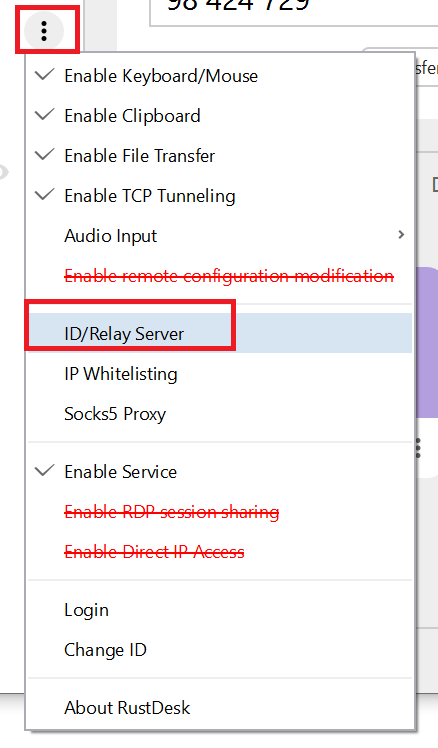
To connect a RustDesk client to your self-hosted server, you need to modify its network settings. On the client application, navigate to the network or ID/Relay Server settings. Here, you will input your server’s public IP address or domain name. You will typically enter this into the “ID Server” and “Relay Server” fields. This tells the client where to find your hbbs and hsts servers. Save these changes, and your client will now attempt to connect to your private instance.
Managing Users and Permissions in Self-Hosted RustDesk
For environments with multiple users, managing permissions is vital. While RustDesk itself doesn’t have a complex built-in user management system like some enterprise solutions, you can implement access control through various methods. This might involve using a database for authentication or integrating with an existing directory service. Furthermore, you can control client access by managing firewall rules on your server. This ensures only authorized devices can connect to your RustDesk self hosted setup.
Troubleshooting Client Connection Issues
Occasionally, clients may struggle to connect to your self-hosted RustDesk server. Common issues include incorrect server addresses, firewall blocks, or misconfigured ports. Always double-check your server’s IP/domain and port settings. Verify that your server’s firewall allows incoming connections on the required TCP and UDP ports. Reviewing server logs (hbbs and hsts) can also provide valuable clues. Patience and systematic checking usually resolve most connection problems.
Maintaining and Securing Your RustDesk Self-Hosted Setup
A successful RustDesk self hosted setup requires ongoing maintenance and vigilance regarding security. Regular updates and proactive measures protect your system from vulnerabilities. Neglecting these aspects can compromise your remote access solution.
Regular Updates and Patches for RustDesk Server
The RustDesk project is actively developed, with frequent updates and security patches. It is crucial to keep your hbbs and hsts servers updated to the latest versions. This ensures you benefit from new features, performance improvements, and critical security fixes. For Docker deployments, this often means pulling new images and recreating containers. Manual installations require downloading and replacing binaries. Staying current is a cornerstone of good security practice.
Backup and Recovery Strategies for Your Setup
Implementing a robust backup strategy is paramount for any self-hosted service. Regularly back up your RustDesk configuration files, SSL certificates, and any associated database files. Store these backups securely and off-site. In case of server failure or data corruption, a reliable backup allows for quick recovery. This minimizes downtime and protects your valuable configuration. Test your recovery process periodically to ensure its effectiveness.
Advanced Security Best Practices for Self-Hosting
Beyond basic setup, consider advanced security measures for your RustDesk self hosted setup. Implement strong, unique passwords for any server access. Use SSH keys instead of passwords for server logins. Configure a robust firewall, allowing only necessary ports. Consider intrusion detection systems (IDS) and regularly audit server logs for suspicious activity. Employing these practices significantly hardens your remote access environment against threats.
Frequently Asked Questions About RustDesk Self-Hosted Setup
Is RustDesk Self-Hosting Free?
Yes, the RustDesk software itself is open-source and free to use. However, you will incur costs for the server infrastructure. This includes a VPS or cloud instance, and potentially a domain name. These infrastructure costs are typically minimal, especially for personal use.
What are the Minimum Server Specs for RustDesk Self-Hosting?
For light usage (1-5 concurrent connections), a server with 1 CPU core, 1GB RAM, and 20GB storage is usually sufficient. More users or heavier traffic will require additional resources. A Linux-based OS is highly recommended.
How Do I Update My Self-Hosted RustDesk Server?
The update process depends on your installation method. For Docker, you typically pull the latest RustDesk images and restart your containers. For manual installations, you download the new binaries from the official GitHub repository and replace the old ones. Always back up your configuration before updating.
Conclusion: Mastering Your RustDesk Self-Hosted Environment
Successfully implementing a RustDesk self hosted setup provides a powerful, secure, and private remote access solution. You gain complete control over your data and connections, bypassing third-party servers. We have covered everything from initial setup and configuration to client connection and ongoing maintenance. By following these guidelines, you can establish a robust and reliable remote desktop environment.
Now is the perfect time to take charge of your remote access needs. Explore the flexibility and security that RustDesk self-hosting offers. Share your experiences or ask further questions in the comments below to help others on their journey to secure remote access!
