
When working with data in Python, efficiently organizing information is crucial. Therefore, understanding how to perform a Python List Sort operation becomes a fundamental skill for any developer. This guide will thoroughly explain the various methods and best practices for sorting lists, ensuring your data is always arranged exactly as you need it. We will explore both in-place modification and the creation of new sorted lists.
The `sort()` Method: In-place Python List Sorting
The `list.sort()` method is a powerful tool built directly into Python’s list objects. Essentially, it modifies the list upon which it is called, rearranging its elements into a specific order. This method is incredibly efficient for sorting lists when you do not need to preserve the original order of the list. Furthermore, it operates “in-place,” meaning it changes the list directly rather than returning a new one.
Basic-usage-of-list-sort">Syntax and Basic Usage of `list.sort()`
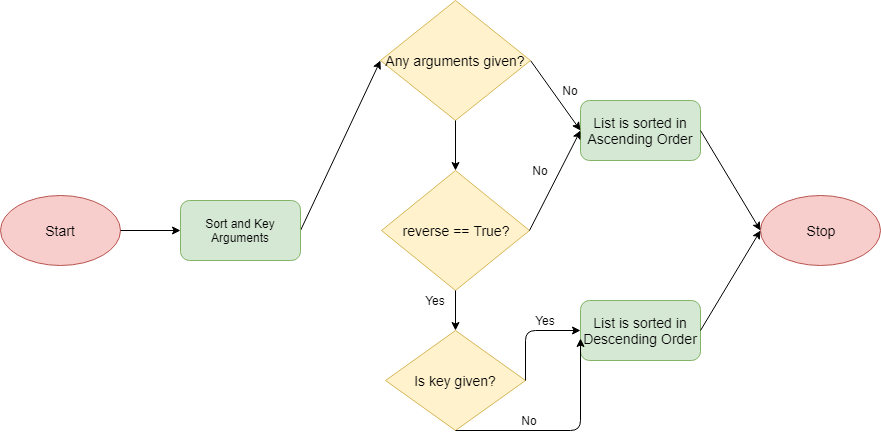
The basic syntax for the `sort()` method is straightforward: `my_list.sort()`. By default, this method sorts the list in ascending order. For instance, a list of numbers will be arranged from smallest to largest. Similarly, strings will be sorted alphabetically. This simple call provides quick and effective list organization.
my_numbers = [3, 1, 4, 1, 5, 9, 2, 6]
my_numbers.sort()
my_numbers is now [1, 1, 2, 3, 4, 5, 6, 9]

my_words = ["banana", "apple", "cherry"]
my_words.sort()
my_words is now ["apple", "banana", "cherry"]
Understanding `reverse=True` for Descending Sort
Sometimes, you need to sort a list in descending order rather than ascending. The `sort()` method accommodates this with its `reverse` parameter. By setting `reverse=True`, you can easily achieve a reverse Python List Sort. This parameter offers great flexibility without needing additional code.
my_numbers = [3, 1, 4, 1, 5, 9, 2, 6]
my_numbers.sort(reverse=True)
my_numbers is now [9, 6, 5, 4, 3, 2, 1, 1]
In-place Modification and `None` Return Value
It is crucial to remember that `list.sort()` modifies the list in place. Consequently, it does not return a new list; instead, it returns `None`. Attempting to assign the result of `my_list.sort()` to a new variable will result in that variable holding `None`. Therefore, always call `sort()` on the list directly and then use the modified list.
- `list.sort()` modifies the original list directly.
- It returns `None`, indicating no new object is created.
- This behavior saves memory, especially for large lists.
The `sorted()` Function: Creating New Sorted Python Lists
In contrast to the `sort()` method, the built-in `sorted()` function provides a way to get a new sorted list without altering the original. This is particularly useful when you need to maintain the original order of your data for subsequent operations. The `sorted()` function is a versatile option for various sorting needs.
Syntax and Basic Usage of `sorted()`
The `sorted()` function takes an iterable (like a list, tuple, or string) as an argument and returns a new list containing all items from the iterable in sorted order. Its basic syntax is `new_list = sorted(my_iterable)`. Like `sort()`, it sorts in ascending order by default. Furthermore, it also supports the `reverse=True` parameter for descending order.
original_numbers = [3, 1, 4, 1, 5, 9, 2, 6]
sorted_numbers = sorted(original_numbers)
sorted_numbers is [1, 1, 2, 3, 4, 5, 6, 9]
original_numbers remains [3, 1, 4, 1, 5, 9, 2, 6]

descending_numbers = sorted(original_numbers, reverse=True)
descending_numbers is [9, 6, 5, 4, 3, 2, 1, 1]
Sorting Any Iterable: Tuples, Strings, Dictionaries
A significant advantage of `sorted()` is its ability to sort any iterable, not just lists. You can sort tuples, strings (which become lists of characters), or even dictionary items. This flexibility makes `sorted()` a highly adaptable function for various data structures. For example, sorting a tuple results in a new list.
my_tuple = (5, 2, 8, 1)
sorted_tuple_as_list = sorted(my_tuple)
sorted_tuple_as_list is [1, 2, 5, 8]

my_string = "python"
sorted_string_chars = sorted(my_string)
sorted_string_chars is ['h', 'n', 'o', 'p', 't', 'y']
Preserving Original List Order
The primary benefit of using `sorted()` for a Python List Sort is that it guarantees the original list remains untouched. This immutability is crucial in many programming scenarios, particularly when you need to perform multiple operations on the same dataset. Always choose `sorted()` when you need a new sorted version without side effects.
Consider using `sorted()` when:
- You need to keep the original list unchanged.
- You are sorting an iterable that is not a list (e.g., tuple, set).
- You want to assign the sorted result to a new variable.
Customizing Python List Sort Behavior with `key`
Both `sort()` and `sorted()` offer a `key` parameter, allowing for highly customized sorting logic. This parameter takes a function that is called on each element before comparisons are made. The return value of this function is then used for sorting. This powerful feature enables complex sorting requirements.
Sorting by Absolute Value with `key=abs`
Imagine you have a list of numbers, including negative values, and you want to sort them by their absolute magnitude. The `key=abs` parameter makes this task simple. The `abs()` function will be applied to each number, and the list will be sorted based on these absolute values. This is a common use case for the `key` parameter.
numbers = [-3, 1, -4, 2]
numbers.sort(key=abs)
numbers is now [1, 2, -3, -4] (sorted by 1, 2, 3, 4)
Case-Insensitive String Sorting with `key=str.lower`
When sorting strings, Python’s default behavior is case-sensitive, meaning ‘A’ comes before ‘a’. To achieve a case-insensitive Python List Sort, you can use `key=str.lower`. This converts each string to lowercase for comparison purposes, but the original casing is preserved in the sorted output. It’s a very practical application of the `key` parameter.
words = ["Banana", "apple", "Cherry", "Date"]
words.sort(key=str.lower)
words is now ["apple", "Banana", "Cherry", "Date"]
Using `lambda` Functions for Complex Key Logic
For more intricate sorting criteria, `lambda` functions are invaluable with the `key` parameter. A `lambda` function allows you to define a small, anonymous function on the fly. For example, you might sort a list of tuples based on their second element. This provides immense flexibility for custom sorting. You can find more examples of `lambda` functions in Python’s official documentation on sorting techniques here.
data = [('apple', 3), ('banana', 1), ('cherry', 2)]
data.sort(key=lambda item: item[1])
data is now [('banana', 1), ('cherry', 2), ('apple', 3)]
Sorting Lists of Custom Objects: Advanced Python List Sort
Sorting lists containing custom objects requires a slightly different approach. You can either define how objects compare to each other within the class or use the `key` parameter to specify which attribute to sort by. This allows for powerful object-oriented sorting.
Sorting by Object Attributes using `key`
The most common way to sort a list of custom objects is by using the `key` parameter with a `lambda` function that extracts a specific attribute. For example, if you have a list of `Person` objects, you can sort them by their `age` attribute. This method is generally preferred for its clarity and flexibility.
class Person:
    def init(self, name, age):
        self.name = name
        self.age = age
    def repr(self):
        return f"Person('{self.name}', {self.age})"

people = [Person('Alice', 30), Person('Bob', 25), Person('Charlie', 35)]
people.sort(key=lambda p: p.age)
people is now [Person('Bob', 25), Person('Alice', 30), Person('Charlie', 35)]
Performance Considerations and Best Practices for Python List Sort
Understanding the performance implications of sorting is vital for writing efficient Python code. Python’s built-in sorting algorithms are highly optimized, but knowing when to use `sort()` versus `sorted()` and understanding their complexities can further enhance your application’s speed.
Time Complexity of Different Sorting Algorithms
Python’s `sort()` and `sorted()` functions implement Timsort, a hybrid sorting algorithm derived from merge sort and insertion sort. Timsort offers excellent performance characteristics. Its average and worst-case time complexity is O(n log n), which is highly efficient for most practical scenarios. However, it can achieve O(n) in best-case scenarios for already partially sorted data.
- Timsort is stable, meaning elements with equal keys maintain their original relative order.
- It is highly optimized for real-world data, often outperforming other algorithms.
- The `key` function adds a slight overhead, but it is usually negligible.
Choosing Between `sort()` and `sorted()`
The choice between `list.sort()` and `sorted()` depends entirely on your specific needs. If you do not require the original list to be preserved and memory efficiency is a concern, `list.sort()` is the better choice. Conversely, if you need a new sorted list while keeping the original intact, `sorted()` is the appropriate function. Always consider the impact on your data structure.
Frequently Asked Questions
What’s the difference between `list.sort()` and `sorted()` in Python?
The main difference lies in their behavior: `list.sort()` is a method that modifies the list in-place and returns `None`, while `sorted()` is a built-in function that returns a new sorted list, leaving the original iterable unchanged. Therefore, choose `sort()` for in-place modification and `sorted()` when you need a new sorted copy.
How do I sort a list of dictionaries in Python by a specific key?
To sort a list of dictionaries, you should use the `key` parameter with a `lambda` function or `operator.itemgetter`. For example, `my_list.sort(key=lambda d: d[‘age’])` will sort a list of dictionaries by the ‘age’ key. This is a very common and effective way to perform a Python List Sort on complex data structures.
Can I sort a list without modifying the original in Python?
Yes, absolutely. You can use the `sorted()` built-in function for this purpose. It takes any iterable as input and returns a new sorted list, ensuring that your original list remains completely untouched. This is ideal for situations where data integrity is paramount.
Conclusion: Mastering Python List Sorting for Efficient Code
Mastering Python List Sort techniques is fundamental for effective data manipulation. Whether you need to modify a list in place using `sort()` or create a new sorted list with `sorted()`, Python provides robust and flexible tools. The `key` parameter further enhances these capabilities, allowing for highly customized sorting logic. By applying these methods, you can write cleaner, more efficient, and more maintainable Python code. Continue experimenting with different sorting scenarios to solidify your understanding. Share your favorite sorting tricks in the comments below!
