
Mastering Bash scripting often involves handling multiple pieces of related data efficiently. Therefore, understanding and utilizing Bash Arrays becomes absolutely crucial for any serious scripter. These powerful data structures allow you to store collections of values under a single variable name. This comprehensive guide will delve into what Bash arrays are, why they are essential, and how to effectively implement them in your scripts.
Understanding Bash Arrays: The Fundamentals
Bash arrays are special variables capable of holding more than one value simultaneously. Each value, or element, is identified by an index or a key. This capability greatly simplifies managing lists of items, such as filenames, user accounts, or configuration parameters. Furthermore, arrays provide a structured way to organize data within your shell scripts.
Indexed Arrays vs. associative arrays
Bash primarily supports two types of arrays: indexed and associative. Indexed arrays use numerical indices, starting from zero, to access elements. They are the most common type and behave similarly to arrays in many other programming languages. Conversely, associative arrays use arbitrary strings as keys, offering a more descriptive way to store and retrieve data. This key-value pair structure is incredibly flexible.
Key Characteristics and Limitations of Bash Arrays
Bash arrays are dynamic, meaning their size can change during script execution. They can store strings, which Bash treats as a sequence of characters. However, a single array cannot directly store mixed data types in the same way some higher-level languages do. Each element is fundamentally a string. It is important to remember that Bash arrays are not global by default; they are local to the shell or function where they are declared.
Basic-syntax-for-array-declaration">Basic Syntax for array declaration
Declaring a simple indexed array is straightforward. You can assign values directly or use the declare -a command. For instance, my_array=(value1 value2 value3) creates an array with three elements. Associative arrays require declare -A before assignment. Understanding this basic syntax is the first step in leveraging Bash arrays effectively.
Declaring and Initializing Bash Arrays
Proper declaration and initialization are vital for working with Bash arrays. Incorrect syntax can lead to unexpected errors or silent failures in your scripts. Therefore, always ensure you follow the correct procedures for both indexed and associative types. This attention to detail will save significant debugging time later.
Declaring Indexed Arrays with `declare -a`
While you can implicitly declare an indexed array by assigning values, explicitly using declare -a array_name is often good practice. This command ensures the variable is treated as an array from the start. It also improves script readability and helps prevent potential issues with variable scope. Many developers prefer this explicit declaration.
Initializing Arrays with Values During Declaration
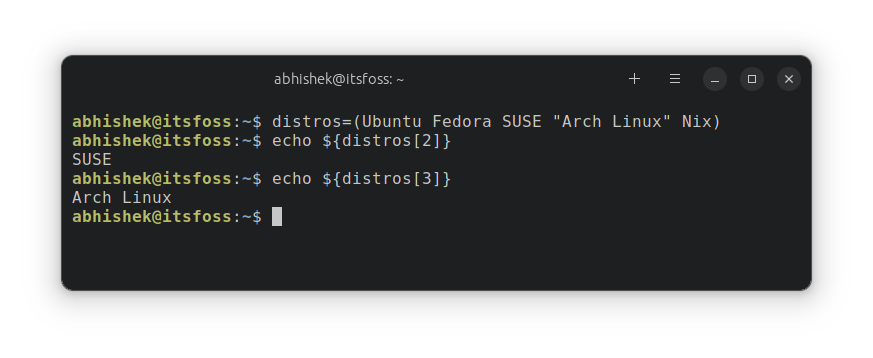
You can initialize an array with values immediately upon declaration. For indexed arrays, use parentheses to enclose the space-separated elements: fruits=("Apple" "Banana" "Cherry"). This creates an array with three elements at indices 0, 1, and 2. This method is concise and commonly used for static data sets. Furthermore, it sets up your Bash arrays for immediate use.
Adding Elements to Existing Bash Arrays
Adding new elements to an existing array is simple. You can append an element by specifying an unused index: my_array[3]="new_value". Alternatively, to append to the end without knowing the current size, use my_array+=("another_value"). This syntax is very convenient for dynamically growing your Bash arrays. It ensures flexibility in your scripting.
Accessing and Manipulating Bash Array Elements
Once you have declared and populated your Bash arrays, you will need to access and modify their contents. Efficient manipulation is key to writing powerful and flexible scripts. Understanding the various methods for interaction is therefore essential for any scripter.
Retrieving Individual Array Elements
To access an individual element in an indexed array, use its index within curly braces: echo "${my_array[0]}". This will print the first element. Similarly, for associative arrays, use the key: echo "${my_assoc_array["key_name"]}". Always remember to use curly braces for proper variable expansion, especially in complex expressions.
Getting All Elements and Determining Array Length
Retrieving all elements from a Bash array is done using "${my_array[@]}" or "${my_array[*]}". The @ expansion treats each element as a separate word, which is generally preferred. To find the number of elements (length) in an array, use echo "${#my_array[@]}". This provides a quick way to determine array size.
Modifying and Deleting Elements from Bash Arrays
Modifying an element is as simple as reassigning a value to its index or key: my_array[1]="Orange". To delete a specific element, use the unset command: unset my_array[1]. This removes the element, but the index remains sparse. To clear an entire array, use unset my_array. These operations provide full control over your array data.
Advanced Bash Array Operations and Best Practices
Moving beyond basic operations, advanced techniques can significantly enhance your array handling capabilities. Employing best practices ensures your scripts are robust, readable, and maintainable. Consequently, investing time in these areas will yield long-term benefits.
Looping Through Bash Arrays Effectively
Iterating over array elements is a common task. A `for` loop is ideal for this purpose. For example, for item in "${my_array[@]}"; do echo "$item"; done will process each element. This method is versatile and ensures proper handling of elements containing spaces. It is a fundamental technique for working with Bash arrays.
Slicing and Subsetting Arrays for Specific Data
Bash allows for basic array slicing, although it is not as feature-rich as in other languages. You can extract a subset of an array using "${my_array[@]:start:length}". For instance, "${my_array[@]:1:2}" gets two elements starting from index 1. This is useful for processing only a portion of your Bash arrays. It offers a degree of granular control.
Best Practices for Robust Bash Array Management
Always quote your array expansions (e.g., "${my_array[@]}") to prevent word splitting and globbing issues. Furthermore, explicitly declare arrays with declare -a or declare -A. Consider using local arrays within functions to avoid global variable conflicts. These practices contribute to more reliable and predictable scripts. For more in-depth information on Bash scripting, you might find the Advanced Bash-Scripting Guide a valuable resource.
Associative Arrays in Bash: Key-Value Pairs
Associative arrays, introduced in Bash 4.0, provide a powerful way to store data using descriptive string keys instead of numerical indices. This feature is incredibly useful for mapping values, similar to dictionaries in Python or hash maps in Java. They offer enhanced readability and flexibility for complex data structures.
Declaring Associative Arrays with `declare -A`
You must explicitly declare an associative array using declare -A assoc_array_name before assigning any elements. Attempting to assign to an undeclared associative array will result in an error or treat it as an indexed array. This explicit declaration is a critical step for proper usage of these Bash arrays. It ensures correct behavior.
Accessing and Modifying Associative Array Elements
Accessing elements in an associative array uses the key within curly braces: echo "${my_settings["username"]}". Similarly, to modify or add elements, assign a value to a key: my_settings["password"]="secure_pass". This intuitive key-based access makes managing configuration settings or lookup tables very efficient. It enhances the utility of Bash arrays.
Iterating Over Keys and Values in Associative Arrays
You can iterate over the keys of an associative array using "${!assoc_array_name[@]}". For example, for key in "${!my_settings[@]}"; do echo "Key: $key, Value: ${my_settings[$key]}"; done. This loop allows you to process both keys and their corresponding values. It is a powerful method for working with these flexible Bash arrays.
Practical Bash Array Examples and Use Cases
Bash arrays are not just theoretical constructs; they have numerous practical applications in everyday scripting. Seeing them in action helps solidify understanding and inspires new ways to solve problems. Developers and system administrators frequently leverage them for various tasks.
Processing Lists of Files or Users with Arrays
Imagine needing to process a list of files. Instead of separate variables, you can store them in a Bash array: files=(*.txt). Then, loop through the array to perform operations on each file. Similarly, managing a list of users for a script becomes much cleaner with arrays. This approach simplifies batch processing significantly.
Storing Configuration Settings in Bash Arrays
Associative Bash arrays are perfect for storing configuration settings. You can define declare -A config; config["database"]="mydb"; config["port"]="5432". Accessing these settings later is easy and descriptive, like echo "${config["database"]}". This method provides a clear and organized way to manage parameters within your scripts.
Implementing Simple Data Structures (e.g., Stack, Queue)
While Bash is not a full-fledged programming language, you can simulate simple data structures using arrays. A stack (LIFO) can be implemented with array+=("item") for push and item="${array[-1]}"; unset 'array[${#array[@]}-1]' for pop. Similarly, queues (FIFO) are also possible. These examples demonstrate the versatility of Bash arrays.
Frequently Asked Questions about Bash Arrays
What’s the difference between `”${array[@]}”` and `”${array[*]}”`?
The primary difference lies in how word splitting occurs. "${array[@]}" expands each element of the array into a separate word, even if an element contains spaces. This is generally the preferred and safer method. Conversely, "${array[*]}" expands all elements into a single word, separated by the first character of IFS. This can lead to unexpected behavior if elements contain spaces.
How do I check if a Bash array is empty or contains specific values?
To check if an array is empty, you can evaluate its length: if [[ ${#my_array[@]} -eq 0 ]]; then echo "Array is empty"; fi. To check for a specific value, you often need to loop through the array. For example, for item in "${my_array[@]}"; do if [[ "$item" == "target" ]]; then echo "Found it!"; break; fi; done. This approach ensures thorough checking.
Can Bash arrays store mixed data types?
Technically, Bash arrays store strings. While you can put a number, a string, or even a command output into an array element, Bash treats all of these as strings. There’s no inherent type enforcement for individual elements like in strongly-typed languages. Therefore, you must manage data type interpretation within your script logic.
What Bash version is required for associative arrays?
Associative arrays were introduced in Bash version 4.0. If you are running an older version of Bash (e.g., Bash 3.x), you will not be able to use associative arrays. You can check your Bash version by running bash --version in your terminal. Upgrading your Bash shell is necessary to utilize this powerful feature.
Conclusion: Elevate Your Bash Scripting with Arrays
Bash arrays are indispensable tools for organizing and manipulating data within your shell scripts. We have explored their fundamental concepts, declaration methods, and various ways to access and modify elements. From simple indexed lists to powerful associative key-value pairs, Bash arrays offer immense flexibility and efficiency. They truly empower developers and system administrators to write more sophisticated and manageable scripts.
By incorporating these techniques, you can significantly enhance the robustness and capabilities of your Bash programs. Therefore, we encourage you to experiment with different array types and operations. Start integrating Bash arrays into your scripts today to streamline your data handling. Share your experiences and creative uses of Bash arrays in the comments below!
