
Embarking on the journey of IT automation can seem daunting, but mastering the fundamentals is key. This guide on an ansible playbook for beginners aims to demystify this powerful tool. We will explore what an Ansible playbook is, why it’s essential for modern infrastructure, and how you can start writing your own. By the end, you will understand how to leverage Ansible for efficient configuration management and deployment.
Introduction to Ansible Playbooks for Beginners
Ansible has emerged as a leading open-source automation engine. It simplifies complex tasks like configuration management, application deployment, and continuous delivery. For beginners, understanding the core component, the Ansible playbook, is the first step. These playbooks are human-readable YAML files that define a set of tasks to be executed on managed hosts.
Learning an ansible playbook for beginners provides a robust foundation in automation. It allows you to automate repetitive tasks, reduce human error, and ensure consistency across your servers. Furthermore, Ansible’s agentless architecture makes it easy to set up and use, requiring only SSH access to your target machines.
What is an Ansible Playbook? Understanding the Fundamentals
An Ansible playbook acts as a blueprint for automation. It describes the desired state of your systems. Instead of writing complex scripts, you define tasks in a simple, declarative language. This approach makes automation accessible even for those new to programming.
Defining Ansible Playbooks and Their Core Purpose
Essentially, an Ansible playbook is a structured list of plays. Each play maps a group of hosts to a set of tasks. These tasks are executed sequentially on the specified hosts. Therefore, playbooks are central to Ansible’s functionality, orchestrating actions across your entire infrastructure.
The core purpose of an ansible playbook for beginners is to define and execute automation workflows. This includes installing software, configuring services, managing files, and deploying applications. They provide a consistent and repeatable way to manage your IT environment, saving significant time and effort.
The Role of YAML in Crafting Your Ansible Playbook
Ansible playbooks are written in YAML (YAML Ain’t Markup Language). YAML is a human-friendly data serialization standard. It uses indentation to denote structure, making playbooks easy to read and write. Understanding Basic YAML syntax is crucial for any beginner.
YAML’s simplicity is a major advantage for an ansible playbook for beginners. You don’t need to learn a complex programming language. Instead, you focus on defining what you want Ansible to do. This clarity helps in quickly grasping automation concepts and applying them effectively.
Why Automation with an Ansible Playbook is Crucial
Automation is no longer a luxury; it’s a necessity in modern IT. An Ansible playbook helps organizations achieve greater efficiency and reliability. It eliminates manual errors and ensures consistent configurations across all servers. This consistency is vital for security and performance.
Furthermore, automation with an Ansible playbook significantly speeds up deployment cycles. Developers can push changes faster, and system administrators can manage infrastructure with less overhead. This agility is critical for staying competitive and responsive in today’s fast-paced technological landscape. You can learn more about Ansible’s capabilities on the official documentation site: Ansible Documentation.
Anatomy of an Ansible Playbook: Essential Components
Every Ansible playbook consists of several key components. Understanding these parts is fundamental to writing effective automation scripts. These elements work together to define the actions Ansible will perform.
Specifying Hosts and Target Systems in Your Playbook
At the beginning of any play, you specify which hosts or groups of hosts the tasks will run against. This is done using the `hosts` directive. Ansible uses an inventory file to define these hosts. The inventory can be a simple text file listing IP addresses or hostnames.
For instance, you might target a group named “webservers” or a specific host like “server1.example.com”. This clear targeting ensures your automation runs on the correct machines. Therefore, careful inventory management is a vital skill for an ansible playbook for beginners.
Tasks: The Building Blocks of Every Ansible Playbook
Tasks are the individual actions that Ansible executes. Each task calls an Ansible module. Modules are small programs that perform specific functions, like installing a package or copying a file. Tasks are defined under the `tasks` section within a play.
A task typically has a name for readability and then specifies the module to use along with its arguments. For example, a task might use the `apt` module to install a package. These tasks are executed in the order they appear in the playbook, ensuring a logical flow of operations.
Exploring Key ansible modules for Beginners
Ansible boasts a vast library of modules, covering almost any task you can imagine. For beginners, some modules are particularly useful:
- `apt` or `yum`: For managing packages on Debian-based or RedHat-based systems, respectively.
- `copy`: To copy files from the control machine to remote hosts.
- `file`: For creating, deleting, or modifying file properties.
- `service`: To manage services (start, stop, restart, enable).
- `user`: For creating or managing user accounts.
These modules provide a solid starting point for an ansible playbook for beginners. Familiarity with these basic modules will allow you to perform a wide range of common automation tasks effectively.
Writing Your First Ansible Playbook: A Practical Example
The best way to learn is by doing. Let’s walk through creating a simple Ansible playbook. This practical example will solidify your understanding of the concepts discussed.
Setting Up Your Environment for Ansible Playbook Creation
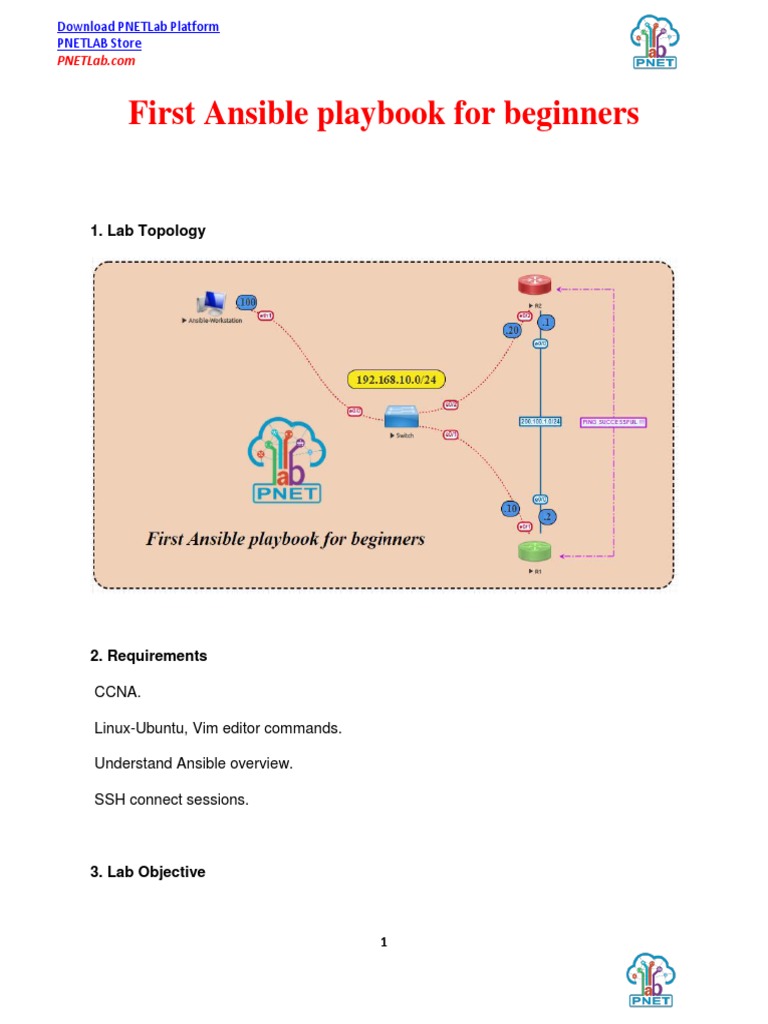
Before writing your playbook, ensure Ansible is installed on your control machine. You also need SSH access to your target host(s). Create a simple inventory file named `inventory.ini`:
[webservers]
your_server_ip_or_hostname ansible_user=your_ssh_user
Replace `your_server_ip_or_hostname` and `your_ssh_user` with your actual details. This setup is crucial for executing your first ansible playbook for beginners.
Step-by-Step: A Simple “Hello World” Ansible Playbook
Now, let’s create a playbook file named `hello_world.yml`. This playbook will install Nginx on your webserver and ensure it’s running.
- Define the target hosts: Start by specifying `hosts: webservers`.
- Add a task to install Nginx: Use the `apt` or `yum` module.
- Add a task to start and enable Nginx: Use the `service` module.
---
- name: Install and Start Nginx
  hosts: webservers
  become: yes # Run tasks with sudo/root privileges
  tasks:
    - name: Update apt cache (Debian/Ubuntu)
      apt:
        update_cache: yes
      when: ansible_os_family == "Debian"

    - name: Install Nginx package
      apt:
        name: nginx
        state: present
      when: ansible_os_family == "Debian"

    - name: Install Nginx package (CentOS/RHEL)
      yum:
        name: nginx
        state: present
      when: ansible_os_family == "RedHat"

    - name: Ensure Nginx service is running and enabled
      service:
        name: nginx
        state: started
        enabled: yes
This simple ansible playbook for beginners demonstrates how to combine modules to achieve a desired state.
Executing and Verifying Your First Ansible Playbook
To run your playbook, use the `ansible-playbook` command:
ansible-playbook -i inventory.ini hello_world.ymlAnsible will connect to your target host, install Nginx, and start the service. You can verify this by trying to access your server’s IP address in a web browser. You should see the Nginx welcome page. This successful execution marks a significant milestone in your learning journey with an ansible playbook for beginners.
Enhancing Your Ansible Playbook: Variables and Conditionals
As you become more comfortable, you’ll want to make your playbooks more flexible and intelligent. Variables and conditionals are powerful tools for this purpose.
Using Variables to Make Your Playbook Dynamic
Variables allow you to store values that can be reused throughout your playbook. This makes playbooks more dynamic and easier to maintain. Instead of hardcoding values, you can define them once and reference them. For example, you can define a package name as a variable.
Variables can be defined in various places, such as in the playbook itself, in inventory files, or in separate variable files. This flexibility is incredibly useful. It helps in creating a robust ansible playbook for beginners that adapts to different environments without modification.
Implementing Conditionals for Smarter Automation
Conditionals enable tasks to run only when certain criteria are met. The `when` clause is used for this. For instance, you might want to install a package only if a specific operating system is detected. This prevents unnecessary actions and potential errors.
Using `when` statements makes your Ansible playbook smarter and more resilient. It ensures that tasks are executed only when appropriate, preventing unintended side effects. This is an advanced but essential concept for any ansible playbook for beginners looking to write more sophisticated automation.
Introduction to Handlers for Service Management
Handlers are special tasks that are only triggered when explicitly notified by another task. They are typically used for service restarts or reloads. For example, if a configuration file changes, you might notify a handler to restart the web server service.
Handlers ensure that services are only restarted when necessary, preventing unnecessary downtime. This makes your automation more efficient. Understanding handlers is a crucial step in writing a truly professional ansible playbook for beginners.
Best Practices for Managing Your Ansible Playbook
Adhering to best practices ensures your playbooks are maintainable, scalable, and effective. Good habits from the start will save you trouble later on.
Ensuring Idempotency and Readability in Playbooks
Idempotency means that running a playbook multiple times will achieve the same result without causing unintended side effects. Ansible modules are designed to be idempotent by default. Always strive to write tasks that are also idempotent. This prevents issues if a playbook is run repeatedly.
Readability is equally important. Use clear names for plays and tasks. Add comments where necessary to explain complex logic. A well-structured and readable ansible playbook for beginners is easier to debug and collaborate on. This makes it a valuable asset for any team.
Common Troubleshooting Tips for Ansible Playbook Issues
Even experienced users encounter issues. Here are some common troubleshooting tips:
- Check YAML syntax: Indentation errors are frequent. Use a YAML linter.
- Run with `-vvv`: This increases verbosity, providing more detailed output.
- Test connectivity: Ensure Ansible can reach your target hosts via SSH.
- Review logs: Examine logs on the target host for clues.
Patience and systematic debugging are key. These tips will help you quickly resolve problems when working with an ansible playbook for beginners.
Organizing Your Ansible Playbooks for Scalability
As your automation grows, proper organization becomes critical. Use roles to structure your playbooks. Roles allow you to group related tasks, variables, handlers, and templates into a reusable structure. This modularity improves maintainability.
Furthermore, keep your inventory files separate from your playbooks. Use version control (like Git) for all your playbooks and inventory. This ensures a clear history of changes and facilitates team collaboration. A well-organized ansible playbook for beginners setup is essential for long-term success.
Frequently Asked Questions (FAQs) About Ansible Playbooks
Many common questions arise when starting with Ansible. Here are answers to some of the most frequent inquiries.
What’s the difference between an Ansible module and a playbook?
An Ansible module is a discrete unit of code that performs a specific task, like installing a package or managing a service. A playbook, however, is a YAML file that orchestrates multiple modules and tasks in a defined sequence. It acts as a script that tells Ansible which modules to run, on which hosts, and in what order. Therefore, modules are the tools, and playbooks are the instructions using those tools.
Can an Ansible playbook manage different operating systems?
Yes, absolutely. Ansible is designed to be cross-platform. You can use a single Ansible playbook to manage a mix of Linux distributions (like Ubuntu, CentOS, RHEL) and even Windows servers. Ansible handles the underlying differences using appropriate modules for each OS. You can also use conditionals (`when` statements) to apply specific tasks only to certain operating systems, making your playbook highly flexible.
How do I secure sensitive information in my Ansible playbook?
Securing sensitive data like passwords or API keys is crucial. Ansible Vault is the recommended solution for this. It allows you to encrypt variables or entire files, protecting them from unauthorized access. When running a playbook that uses encrypted data, Ansible will prompt you for the Vault password. This ensures your sensitive information remains secure while still being usable by your automation. It’s an essential security practice for any serious ansible playbook for beginners.
Conclusion: Master Your First Ansible Playbook and Beyond
You have now taken significant steps towards understanding and utilizing an ansible playbook for beginners. We’ve covered the fundamentals, explored the anatomy of a playbook, walked through a practical example, and discussed best practices. Ansible’s simplicity and power make it an invaluable tool for anyone in IT operations or development.
The journey into automation is continuous. Keep experimenting with different modules, explore roles, and contribute to the Ansible community. By consistently applying what you’ve learned, you’ll soon be automating complex workflows with confidence. Start writing your own playbooks today and transform the way you manage your infrastructure. What will you automate next?
