
Securing user accounts is paramount in any Linux environment. Therefore, a deep understanding of the /etc/shadow file is absolutely crucial for system administrators. This critical file plays a central role in safeguarding user passwords and enforcing robust security policies. It stores sensitive password information in a highly protected manner, preventing unauthorized access. This article will explore its purpose, structure, and best practices for management.
Introduction to the /etc/shadow File
The `/etc/shadow` file is a fundamental component of Linux security. It stores encrypted user password information. Additionally, it holds details about password aging and expiration policies. This separation of password hashes from the public `/etc/passwd` file significantly enhances system security. Consequently, only privileged processes can access its contents.
Historically, passwords were kept in `/etc/passwd`. However, this file is readable by all users. This presented a significant security vulnerability. The introduction of `/etc/shadow` addressed this flaw, moving sensitive data to a restricted location. Therefore, it is a cornerstone of modern Linux security architecture.
Understanding the /etc/shadow File: What It Is and Its Purpose
The `/etc/shadow` file is a plain text file, yet its contents are highly sensitive. It contains a line for each user account on the system. Each line details the username, the hashed password, and various password policy settings. This file is only readable by the root user and members of the ‘shadow’ group. This strict permission model prevents regular users from even viewing hashed passwords, thus protecting against offline brute-force attacks.
The Critical Role of /etc/shadow in Linux Security
Its primary role is to protect user authentication credentials. By isolating password hashes, it prevents their easy compromise. Furthermore, it allows administrators to define password expiration, minimum password age, and account inactivity policies. These features are vital for maintaining strong security posture over time. Without `/etc/shadow`, Linux systems would be far more vulnerable to unauthorized access.
Why /etc/passwd Alone Was Insufficient for Security
Originally, the `/etc/passwd` file contained both user account information and password hashes. This file, however, must be globally readable for many system utilities to function correctly. Any user could read the hashed passwords. This made systems susceptible to dictionary attacks and brute-force attempts. Attackers could download the hashes and attempt to crack them offline.
Key Differences Between /etc/passwd and /etc/shadow
The distinction between these two files is crucial for Linux security. They work in tandem but serve different security functions. Understanding their roles helps in securing a system effectively. Here are the main differences:
- Accessibility: `/etc/passwd` is world-readable; `/etc/shadow` is accessible only by root.
- Content: `/etc/passwd` stores user details (username, UID, GID, home directory, shell); `/etc/shadow` stores password hashes and aging information.
- Security: `/etc/shadow` provides enhanced security by isolating sensitive password data.
Structure and Fields of the /etc/shadow File
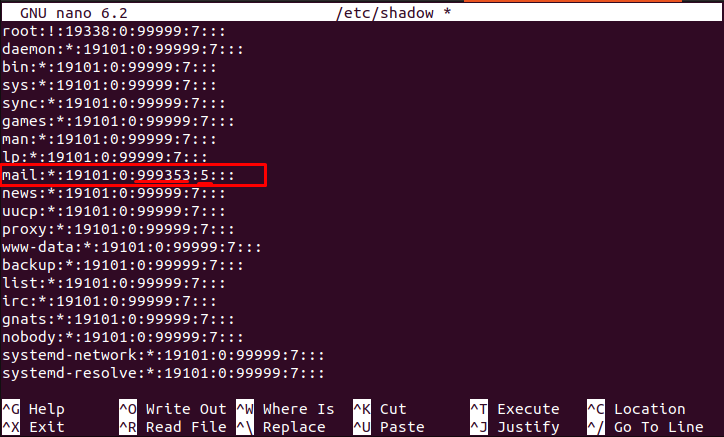
Each line in the `/etc/shadow` file represents a user account. These lines are composed of nine colon-separated fields. Each field holds specific information related to the user’s password and account status. Understanding these fields is essential for proper system administration and security auditing. For instance, the second field contains the encrypted password hash.
Dissecting Each Field: Username, Hashed Password, Last Change Date
The first field is the username. The second field contains the hashed password, often prefixed with a hash algorithm identifier (e.g., `$6$` for SHA-512). The third field indicates the last password change date, represented as days since January 1, 1970. This timestamp is important for enforcing password aging policies. It helps track compliance.
Understanding Password Expiration, Inactivity, and Account Lockout Fields
Subsequent fields control password policies. The fourth field specifies the minimum password age (days before a password can be changed again). The fifth field sets the maximum password age (days after which a password must be changed). The sixth field defines the warning period (days before password expiration a user is warned). The seventh field dictates the inactivity period (days after password expiration an account is disabled). The eighth field is the account expiration date (days since epoch when the account becomes unusable). Finally, the ninth field is reserved for future use.
Practical Examples of /etc/shadow Entries and Their Meanings
Consider an entry like `john:$6$saltvalue$hashedpass:19000:0:90:7:30::`. Here, ‘john’ is the username. The `$6$` indicates SHA-512 hashing. ‘19000’ means the password was last changed 19000 days after Jan 1, 1970. ‘0’ means no minimum age. ’90’ sets a 90-day maximum age. ‘7’ provides a 7-day warning. ’30’ allows 30 days of inactivity before lockout. The empty field means no account expiration. This detailed structure ensures granular control over user account security.
How Passwords Are Stored and Secured in /etc/shadow
Passwords are never stored in plain text within the `/etc/shadow` file. Instead, they undergo a cryptographic hashing process. This one-way transformation converts the password into a fixed-length string. If the hash is compromised, the original password cannot be easily retrieved. This design is fundamental to modern password security practices.
Overview of Password Hashing Algorithms (e.g., SHA-512, bcrypt)
Linux systems utilize strong hashing algorithms for password storage. Common algorithms include SHA-512, which is widely adopted for its robustness. Other modern algorithms like bcrypt and scrypt are also gaining popularity. These algorithms are designed to be computationally intensive, making brute-force attacks extremely time-consuming. This resistance to rapid decryption is a key security feature.
The Indispensable Role of Salts in Enhancing Password Security
Salting is a critical technique used with password hashing. A unique, random string (the salt) is added to each password before hashing. This means two identical passwords will produce different hashes if their salts differ. Salting effectively defeats pre-computed rainbow tables. It also forces attackers to crack each password individually, significantly increasing the effort required. The salt is stored alongside the hashed password in the `/etc/shadow` file.
Interpreting the Hashed Password String in the Shadow File
A typical hashed password string in `/etc/shadow` follows a specific format. It usually starts with an identifier for the hashing algorithm, like `$1$` for MD5, `$5$` for SHA-256, or `$6$` for SHA-512. Following this, the salt is embedded, then the actual hashed password. For example, `$6$randomsalt$actualhashvalue` clearly shows the algorithm, salt, and hash. This structure allows the system to verify passwords efficiently during login. It also maintains security by not revealing the original password.
Managing and Modifying the /etc/shadow File
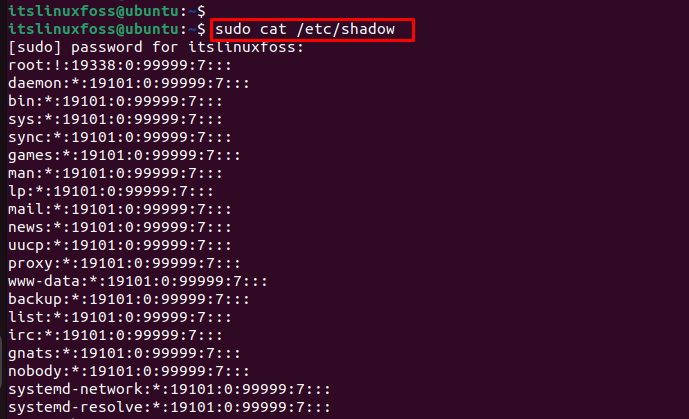
While the `/etc/shadow` file stores critical information, direct manual editing is strongly discouraged. Incorrect modifications can easily corrupt user accounts or lock users out of the system. Instead, administrators should always use specialized command-line tools. These tools ensure data integrity and proper syntax. They provide a safe interface for managing user passwords and account policies.
Essential Tools for User and Password Management: passwd, useradd, usermod
Several standard Linux utilities are designed for managing user accounts and their associated shadow file entries. The passwd command is used to change a user’s password. It updates the hashed password field in `/etc/shadow`. The useradd command creates new user accounts, including their initial shadow entry. Similarly, usermod modifies existing user account properties, which can indirectly affect shadow file settings. For example, it can set account expiration dates. For more details on these commands, refer to their respective man pages or a comprehensive Linux administration guide like the Arch Wiki: Users and groups.
- Use
passwd [username]to change a user’s password securely. - Employ
useradd [options] [username]to create new user accounts. - Utilize
usermod [options] [username]to modify existing user attributes.
The Dangers and Discouragement of Direct /etc/shadow Editing
Directly editing `/etc/shadow` with a text editor like `vi` or `nano` is extremely risky. A single typo can render a user’s password invalid or even corrupt the entire file. This could lead to a system where no one can log in. Furthermore, direct editing bypasses the integrity checks performed by the official utilities. Always rely on the provided command-line tools for modifications. These tools handle the complexities safely.
Strategies for Recovering a Lost Root Password Using Shadow File Principles
Losing the root password can be a serious issue. However, recovery is possible, often involving booting into single-user mode. In this mode, the system typically boots with root privileges without requiring a password. From there, the `passwd` command can be used to reset the root password. This process effectively updates the `/etc/shadow` file. It’s a critical recovery mechanism, highlighting the importance of physical security for servers. Understanding the /etc/shadow file’s role in this process is key.
Security Best Practices for Understanding the /etc/shadow File
Maintaining the integrity and security of the `/etc/shadow` file is paramount for overall system security. Implementing best practices helps prevent unauthorized access and potential compromises. Proactive measures are always better than reactive solutions. Therefore, administrators must be vigilant in their approach to this critical file.
Ensuring Correct Permissions and Ownership for /etc/shadow
The permissions for `/etc/shadow` should always be `0640`. This means only the root user has read and write access. Members of the ‘shadow’ group have read-only access. No other users should have any access. The file’s ownership should be `root:shadow`. These strict permissions are fundamental. They prevent unauthorized viewing or modification of password hashes. Regularly verify these settings.
Protecting Against Brute-Force and Dictionary Attacks on Password Hashes
Even with strong hashing and salting, password hashes can be targeted. Implement strong password policies, including complexity requirements and regular changes. Utilize account lockout mechanisms after multiple failed login attempts. Tools like Fail2ban can automatically block IP addresses attempting brute-force attacks. Furthermore, educating users about creating strong, unique passwords is vital. This layered approach enhances security.
Monitoring and Auditing Changes to the Shadow File for Integrity
Regularly monitoring the `/etc/shadow` file for unexpected changes is a critical security practice. Tools like `auditd` can log all access and modification attempts. File integrity monitoring (FIM) solutions, such as AIDE, can detect unauthorized alterations. Scheduled checks for file permissions and ownership are also recommended. Any suspicious activity should trigger an immediate investigation. This vigilance helps maintain system integrity.
Frequently Asked Questions About the /etc/shadow File
Many common questions arise regarding the `/etc/shadow` file due to its critical security role. Addressing these helps clarify its functionality and importance. A comprehensive understanding of this file is vital for any Linux administrator. It ensures secure system operation.
Can a regular user view the contents of the /etc/shadow file?
No, a regular user cannot directly view the contents of the `/etc/shadow` file. The file permissions are specifically set to `0640`, meaning only the root user has read and write access. The ‘shadow’ group typically has read access, but regular users are not part of this group. This restriction is a core security feature, preventing unauthorized access to password hashes.
What are the implications if the /etc/shadow file becomes corrupted or deleted?
If the `/etc/shadow` file becomes corrupted or deleted, the implications are severe. Users will be unable to log in, as the system cannot verify their passwords. This can lead to a complete system lockout. Recovery often requires booting into a rescue environment or single-user mode to restore a Backup or manually reconstruct the file. Therefore, regular backups of this file are absolutely essential.
How do I enforce strong password policies using the /etc/shadow file’s capabilities?
You can enforce strong password policies by configuring the fields within the `/etc/shadow` file. Specifically, the minimum password age (field 4), maximum password age (field 5), and warning period (field 6) can be set. Additionally, tools like `chage` allow administrators to modify these parameters for individual users. Combining these with system-wide password complexity rules (e.g., via PAM modules) ensures robust password security. Understanding the /etc/shadow file’s fields is key to this enforcement.
Conclusion: Mastering /etc/shadow for Robust Linux Security
In conclusion, understanding the /etc/shadow file is indispensable for anyone managing a Linux system. This file is the bedrock of user password security, providing a secure repository for hashed passwords and enforcing crucial aging policies. Its strict permissions and cryptographic mechanisms are vital defenses against unauthorized access. Proper management using designated tools is essential to maintain system integrity. By adhering to best practices, administrators can significantly enhance the security posture of their Linux environments. Continue to explore advanced security topics and keep your knowledge current.
