
Optimizing shell scripts for efficiency and reusability is a common goal for developers and system administrators. Bash Functions offer a powerful solution, allowing you to encapsulate blocks of code for execution on demand. Before diving in, let’s clarify what Bash Functions actually means: they are named sections of code that can be called repeatedly within a script or from the command line. This capability significantly streamlines scripting tasks, reducing redundancy and improving code maintainability.
Understanding Bash Functions: Core Concepts
Bash functions are fundamental building blocks in shell scripting. They enable modular programming, allowing complex scripts to be broken down into smaller, manageable units. Furthermore, this approach enhances readability and simplifies debugging processes. Understanding these core concepts is crucial for anyone looking to master shell scripting.
Defining and Declaring Bash Functions
Defining a Bash function involves giving a name to a sequence of commands. There are two primary syntaxes for declaring Bash Functions. The most common method uses the `function` keyword, making the declaration explicit. Alternatively, you can define a function by simply listing its name followed by parentheses. Both methods achieve the same result, creating a callable block of code.
- Method 1 (Recommended):
function my_function { commands; } - Method 2:
my_function() { commands; } - Functions are typically defined at the beginning of a script or in a separate library file.
Basic-structure-of-a-bash-function">Syntax and Basic Structure of a Bash Function
The basic structure of a Bash function is straightforward. It begins with the function name, followed by parentheses (if not using the `function` keyword), and then curly braces containing the commands. Each command within the braces is executed sequentially when the function is called. Importantly, the curly braces define the function’s scope, enclosing all its internal operations.
For example, a simple function might print a greeting. This structure promotes clear organization and makes scripts easier to follow. Consequently, even complex operations become manageable when broken into smaller functions.
Why Use Bash Functions? Benefits and Advantages
The advantages of using Bash Functions are numerous. Firstly, they promote code reusability, meaning you write a block of code once and call it multiple times. Secondly, functions improve script organization and readability, making complex scripts easier to understand and maintain. Additionally, they help reduce errors by isolating specific functionalities. Therefore, functions are indispensable for efficient and robust shell scripting.
- Modularity: Break down large scripts into smaller, manageable parts.
- Reusability: Avoid repeating code blocks, saving time and effort.
- Readability: Improve script clarity and ease of understanding.
- Maintainability: Simplify updates and bug fixes by isolating functionality.
Working with Bash Functions: Practical Implementation
Implementing Bash Functions in your scripts is a practical way to enhance their capabilities. From simple command execution to handling complex data, functions provide the necessary structure. This section explores how to call functions, pass arguments, and manage return values effectively. Mastering these aspects is key to writing dynamic and interactive shell scripts.
Calling and Executing Bash Functions
Once defined, calling a Bash function is as simple as typing its name. When the shell encounters the function name, it executes the commands within its definition. For instance, if you define a function named `greet`, you simply type `greet` to run it. This direct execution makes functions incredibly accessible and easy to integrate into your scripts. Furthermore, functions can be called from other functions, creating powerful nested operations.
Passing Arguments to Bash Functions
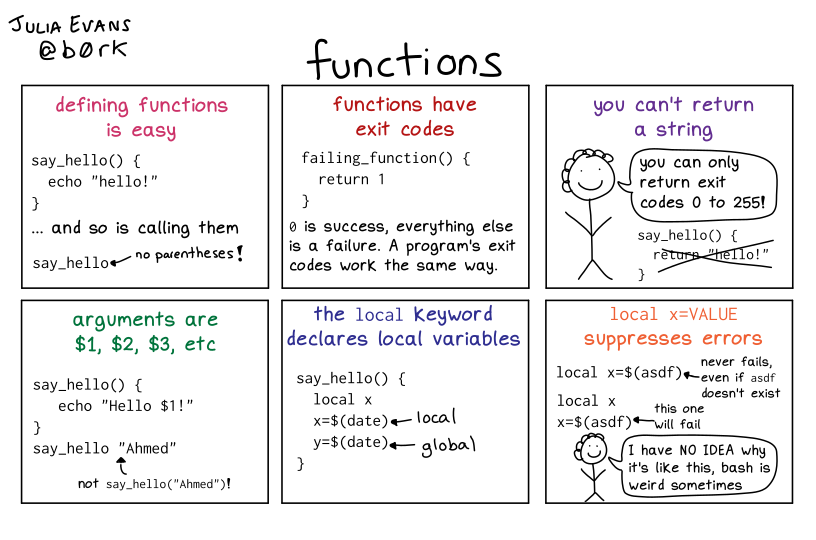
Bash functions can accept arguments, making them highly versatile. Arguments are passed to a function just like they are passed to a regular shell script: by listing them after the function name. Inside the function, these arguments are accessed using positional parameters like `$1`, `$2`, and so on. The special variable `$@` refers to all arguments, and `$#` indicates the number of arguments. This capability allows functions to perform different actions based on the input they receive.
- Define the function to accept arguments (e.g., `my_func() { echo “Hello, $1”; }`).
- Call the function with arguments (e.g., `my_func World`).
- Access arguments inside the function using `$1`, `$2`, etc.
Returning Values from Bash Functions
Bash functions typically return values using the `return` command, which sets the exit status of the function. This status is an integer between 0 and 255, where 0 usually indicates success and non-zero values signify an error. To capture output other than the exit status, you can echo the desired value from the function and capture it using command substitution. For example, `result=$(my_function)` will store the echoed output in the `result` variable. This mechanism allows functions to communicate results back to the calling script.
Advanced Bash Functions: Scope, Recursion, and More
Beyond basic usage, Bash Functions offer advanced features that empower more sophisticated scripting. Understanding variable scope, implementing recursion, and utilizing function libraries are crucial for complex automation tasks. These advanced concepts enable developers to write more robust, efficient, and maintainable shell scripts. Consequently, they unlock a higher level of control and flexibility.
Local vs. Global Variables in Bash Functions
Variable scope is a critical concept in Bash functions. By default, variables defined within a function are global, meaning they can be accessed and modified from anywhere in the script. However, using the `local` keyword declares a variable that is only accessible within that specific function. This practice helps prevent unintended side effects and promotes cleaner code. Strongly consider using `local` for variables that are not meant to be shared globally.
For instance, a `local` variable named `count` inside a function will not conflict with a `count` variable defined outside it. This isolation is vital for writing reliable and modular scripts. Therefore, understanding and applying variable scope correctly is a cornerstone of advanced Bash scripting.
Recursive Bash Functions: Solving Complex Problems
Recursion allows a function to call itself, which is a powerful technique for solving problems that can be broken down into smaller, similar sub-problems. Common applications include traversing directory structures or calculating factorials. However, careful implementation is necessary to prevent infinite loops, which can crash your script. A base case is always required to terminate the recursion.
For example, a recursive function to calculate factorial would have a base case for 0 or 1. Furthermore, each recursive call would work towards this base case. This elegant approach simplifies certain algorithmic challenges.
Function Libraries and Sourcing Bash Functions
To maximize reusability, you can organize related Bash Functions into separate files, known as function libraries. These libraries can then be “sourced” into any script using the `source` command or its shorthand, `.`. Sourcing a file executes its contents in the current shell environment, making all defined functions available. This practice is particularly useful for building a collection of utility functions that can be shared across multiple projects. It promotes a highly modular and efficient development workflow.
For instance, you might have a `utils.sh` file containing common helper functions. Then, in your main script, you would simply add `source utils.sh` to access them. This method ensures consistency and reduces code duplication across your entire scripting environment.
Best Practices and Troubleshooting Bash Functions
Writing effective Bash Functions involves more than just understanding syntax; it requires adopting best practices for readability, error handling, and debugging. Following these guidelines ensures your functions are robust, easy to maintain, and perform reliably. Consequently, your shell scripts will be more stable and user-friendly. Adhering to these principles is crucial for long-term success.
Naming Conventions and Code Readability for Bash Functions
Clear naming conventions are vital for code readability. Function names should be descriptive, indicating their purpose or action. Use lowercase letters and underscores to separate words (e.g., `calculate_sum`, `log_message`). Furthermore, consistent indentation and comments explaining complex logic significantly improve understanding. A well-named and formatted function is much easier to debug and reuse. Therefore, invest time in making your code clear and self-documenting.
Error Handling within Bash Functions
Robust scripts anticipate and handle errors gracefully. Within Bash Functions, you can use conditional statements to check for potential issues, such as missing arguments or failed commands. The `set -e` option can be used at the beginning of a script to exit immediately if any command fails. Additionally, you can provide informative error messages using `>&2` to direct output to standard error. This proactive approach prevents unexpected script termination and helps users diagnose problems.
For example, a function expecting an argument might check if `$# -eq 0` and print an error if no argument is provided. This ensures the function behaves predictably. Consequently, it makes your scripts more resilient.
Debugging Common Issues with Bash Functions
Debugging Bash functions can sometimes be challenging. The `set -x` command is invaluable for tracing script execution, displaying each command and its arguments as they are run. You can place `set -x` at the beginning of a script or just before a problematic function. Additionally, printing variable values at different stages helps in understanding the function’s state. Using `echo` statements strategically can reveal unexpected behavior. For more advanced debugging, consider tools like `bashdb`.
Understanding common pitfalls, such as incorrect variable scope or argument handling, is also beneficial. For further reading on Bash scripting best practices, you can refer to the GNU Bash Reference Manual. This resource provides comprehensive details on all aspects of Bash.
Frequently Asked Questions About Bash Functions
Many users have common questions when first encountering Bash Functions. This section addresses some of the most frequently asked queries, providing clear and concise answers. Understanding these points will help solidify your grasp of function capabilities and best practices. Therefore, read through these questions for quick clarifications.
alias">What is the difference between a Bash function and an alias?
A Bash function is a block of commands that can accept arguments and perform complex logic, essentially acting like a mini-script within your shell. Conversely, an alias is a simple shortcut for a single command or a short sequence of commands. Aliases do not typically accept arguments in the same flexible way functions do. Functions offer much greater power and flexibility for scripting tasks.
Can Bash functions be nested?
Yes, Bash functions can be nested. This means you can define a function inside another function. However, the inner function is only accessible from within the outer function. While possible, nesting functions can sometimes reduce readability if overused. It’s often better to keep functions separate and call them from one another if complex interactions are needed, maintaining a flatter structure for clarity.
How do I make a Bash function available in all my shell sessions?
To make a Bash function persistent across all your shell sessions, you need to define it in one of your shell’s startup files. Commonly, this would be `~/.bashrc` for interactive shells or `~/.profile` for login shells. After adding the function definition to the file, save it and then either source the file (`source ~/.bashrc`) or restart your terminal. This ensures the function is loaded every time a new shell session begins.
Conclusion: Harnessing the Power of Bash Functions
Bash Functions are an indispensable tool for anyone working with the command line or developing shell scripts. They provide a robust framework for modularity, reusability, and enhanced script organization. By understanding their core concepts, practical implementation, and advanced features, you can significantly boost your scripting efficiency and create more maintainable code. Consequently, mastering functions will elevate your shell scripting skills to a professional level.
Start integrating Bash functions into your daily scripting tasks today. Experiment with different approaches, leverage arguments and return values, and always strive for clear, readable code. Share your favorite Bash function tips in the comments below, or explore our other articles on advanced shell scripting techniques .
